Skip to content
kaspersky beta
  • Login

  • Don't have an account? Register

  • Login or register to search.
  • Categories
  • KForum
  • KClub
  • kaspersky
  1. Home
  2. Kaspersky Beta Testing – English User Community
  3. Kaspersky Beta News
  4. Please help us test a new feature on the release version of Kaspersky MR20.

Please help us test a new feature on the release version of Kaspersky MR20.

Scheduled Pinned Locked Moved Kaspersky Beta News
51 Posts 5 Posters 20.8k Views 3 Watching
  • Oldest to Newest
  • Newest to Oldest
  • Most Votes
Reply
  • Reply as topic
Log in to reply
This topic has been deleted. Only users with topic management privileges can see it.
  • xzz123X Offline
    xzz123X Offline
    xzz123
    Moderators
    wrote on last edited by
    #21

    Chrome got an update and the new function works fine.

    1 Reply Last reply
    0
    • harlan4096H Offline
      harlan4096H Offline
      harlan4096
      βTester
      wrote on last edited by harlan4096
      #22

      I just updated to KES 12.9, and I had manually enabled SuperM previously with KES 12.8, but now I see KES 12.9 disabled or removed the tweak 🤔

      S1 (Desktop MELPOMENIA): KES14.1 + W11 Pro 25H2 * S2 (Desktop TERMINUS): Kaspersky Premium 21.27 beta + W10 IoT Enterprise LTSC Pro 21H2 * S3 (VM): KES Cloud 14.1 + W11 IoT Enterprise LTSC 24H2

      D 1 Reply Last reply
      0
      • harlan4096H harlan4096

        I just updated to KES 12.9, and I had manually enabled SuperM previously with KES 12.8, but now I see KES 12.9 disabled or removed the tweak 🤔

        D Offline
        D Offline
        Dmitriy.Pisarets
        Kaspersky Lab
        wrote on last edited by
        #23

        @harlan4096 said in Please help us test a new feature on the release version of Kaspersky MR20.:

        KES 12.9 disabled

        Hello! Feature is disabled as far as I know, but have no info about any plans for official releasing it.

        harlan4096H 1 Reply Last reply
        1
        • D Dmitriy.Pisarets

          @harlan4096 said in Please help us test a new feature on the release version of Kaspersky MR20.:

          KES 12.9 disabled

          Hello! Feature is disabled as far as I know, but have no info about any plans for official releasing it.

          harlan4096H Offline
          harlan4096H Offline
          harlan4096
          βTester
          wrote on last edited by harlan4096
          #24

          @Dmitriy.Pisarets

          I tried to enable manually again with new KES 12.9, but looks not working with this new version 🤔

          This is a trick to check it:

          "You can check using Process Explorer. Open Firefox/Edge/Chrome, open Process Explorer. Now in process explorer right click on the main firefox.exe (not any of the child process) and click on Properties, now go to the Environment section. Now look for SSLKEYLOGFILE. If you see it then it's doing what Avast does. If not then Kaspersky is using some other method.

          Example: https://textslashplain.com/wp-content/uploads/2019/08/sslkeylogfileeb.png"

          And KES 12.8 I got that Environment key in my Mozilla FireFox: https://malwaretips.com/attachments/1744304648433-png.288064/

          But not now with KES 12.9 🤔

          S1 (Desktop MELPOMENIA): KES14.1 + W11 Pro 25H2 * S2 (Desktop TERMINUS): Kaspersky Premium 21.27 beta + W10 IoT Enterprise LTSC Pro 21H2 * S3 (VM): KES Cloud 14.1 + W11 IoT Enterprise LTSC 24H2

          1 Reply Last reply
          0
          • harlan4096H Offline
            harlan4096H Offline
            harlan4096
            βTester
            wrote on last edited by
            #25

            I'm testing SuperMITM with the last beta build of KPrem. 21.23, and with the current official release of KES 12.10:

            https://malwaretips.com/threads/kaspersky-vpn-ksos-21-23-kes-12-11-betas.137071/post-1140870

            S1 (Desktop MELPOMENIA): KES14.1 + W11 Pro 25H2 * S2 (Desktop TERMINUS): Kaspersky Premium 21.27 beta + W10 IoT Enterprise LTSC Pro 21H2 * S3 (VM): KES Cloud 14.1 + W11 IoT Enterprise LTSC 24H2

            1 Reply Last reply
            0
            • W Offline
              W Offline
              wbywby456456
              wrote on last edited by
              #26

              Is the testing still ongoing? I'm currently using KIS 21.24. The Kaspersky certificate issue persists in Firefox, but Edge browser functions normally.

              D 1 Reply Last reply
              0
              • W wbywby456456

                Is the testing still ongoing? I'm currently using KIS 21.24. The Kaspersky certificate issue persists in Firefox, but Edge browser functions normally.

                D Offline
                D Offline
                Dmitriy.Pisarets
                Kaspersky Lab
                wrote on last edited by
                #27

                @wbywby456456 said in Please help us test a new feature on the release version of Kaspersky MR20.:

                Is the testing still ongoing?

                Hello! Are you talking about MITM feature or common beta testing?
                If you have issues, you can report them with traces (or with screen recording, if it possible) here https://eap.kaspersky.com/category/1291/traffic-checking-av-web-mail

                W 1 Reply Last reply
                1
                • D Dmitriy.Pisarets

                  @wbywby456456 said in Please help us test a new feature on the release version of Kaspersky MR20.:

                  Is the testing still ongoing?

                  Hello! Are you talking about MITM feature or common beta testing?
                  If you have issues, you can report them with traces (or with screen recording, if it possible) here https://eap.kaspersky.com/category/1291/traffic-checking-av-web-mail

                  W Offline
                  W Offline
                  wbywby456456
                  wrote on last edited by
                  #28

                  @Dmitriy.Pisarets It is the SuperMITM feature in this post.

                  harlan4096H 1 Reply Last reply
                  0
                  • W wbywby456456

                    @Dmitriy.Pisarets It is the SuperMITM feature in this post.

                    harlan4096H Offline
                    harlan4096H Offline
                    harlan4096
                    βTester
                    wrote on last edited by
                    #29

                    @wbywby456456

                    The testing continues, but You have to enable the SuperMITM in every beta manually, modifying the Windows Registry.

                    S1 (Desktop MELPOMENIA): KES14.1 + W11 Pro 25H2 * S2 (Desktop TERMINUS): Kaspersky Premium 21.27 beta + W10 IoT Enterprise LTSC Pro 21H2 * S3 (VM): KES Cloud 14.1 + W11 IoT Enterprise LTSC 24H2

                    W 1 Reply Last reply
                    1
                    • harlan4096H harlan4096

                      @wbywby456456

                      The testing continues, but You have to enable the SuperMITM in every beta manually, modifying the Windows Registry.

                      W Offline
                      W Offline
                      wbywby456456
                      wrote on last edited by
                      #30

                      @harlan4096
                      I enabled this feature through the registry, but after restarting my computer several times, I noticed that both Edge and Firefox browsers reverted to using Kaspersky's local certificate to detect encrypted traffic. My Kaspersky version is 21.24.8.522.

                      harlan4096H W 2 Replies Last reply
                      0
                      • W wbywby456456

                        @harlan4096
                        I enabled this feature through the registry, but after restarting my computer several times, I noticed that both Edge and Firefox browsers reverted to using Kaspersky's local certificate to detect encrypted traffic. My Kaspersky version is 21.24.8.522.

                        harlan4096H Offline
                        harlan4096H Offline
                        harlan4096
                        βTester
                        wrote on last edited by harlan4096
                        #31

                        @wbywby456456

                        I have it enabled in official KES 12.12.0.522, to do so, I added the key here:
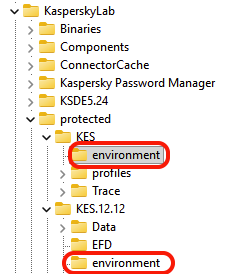
                        6c6791d2-6e45-45d1-be7c-e890a2d7c448-imagen.png

                        And the proof in Process Explorer -> FireFox (Environment tab in main process):

                        b1564f80-28f7-464d-9d9f-e5ca7fc0462b-imagen.png

                        Try also re-enabling Self-Defense, after rebooting.

                        P.S.: another proof, the cert. of this site:
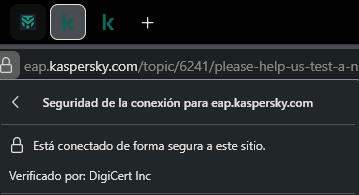
                        46e52880-c33b-42ab-abae-adb4fb08173e-imagen.png

                        S1 (Desktop MELPOMENIA): KES14.1 + W11 Pro 25H2 * S2 (Desktop TERMINUS): Kaspersky Premium 21.27 beta + W10 IoT Enterprise LTSC Pro 21H2 * S3 (VM): KES Cloud 14.1 + W11 IoT Enterprise LTSC 24H2

                        1 Reply Last reply
                        1
                        • W wbywby456456

                          @harlan4096
                          I enabled this feature through the registry, but after restarting my computer several times, I noticed that both Edge and Firefox browsers reverted to using Kaspersky's local certificate to detect encrypted traffic. My Kaspersky version is 21.24.8.522.

                          W Offline
                          W Offline
                          wbywby456456
                          wrote on last edited by
                          #32

                          @dmitriy.pisarets I followed the instructions in this post, but after restarting my computer several times, everything reverted back to the way it was before.I noticed that both Edge and Firefox browsers reverted to using Kaspersky's local certificate to detect encrypted traffic. My Kaspersky version is 21.24.8.522.

                          harlan4096H D 2 Replies Last reply
                          1
                          • W wbywby456456

                            @dmitriy.pisarets I followed the instructions in this post, but after restarting my computer several times, everything reverted back to the way it was before.I noticed that both Edge and Firefox browsers reverted to using Kaspersky's local certificate to detect encrypted traffic. My Kaspersky version is 21.24.8.522.

                            harlan4096H Offline
                            harlan4096H Offline
                            harlan4096
                            βTester
                            wrote on last edited by
                            #33

                            @wbywby456456

                            Please attach captures of Your Windows registry keys added...

                            S1 (Desktop MELPOMENIA): KES14.1 + W11 Pro 25H2 * S2 (Desktop TERMINUS): Kaspersky Premium 21.27 beta + W10 IoT Enterprise LTSC Pro 21H2 * S3 (VM): KES Cloud 14.1 + W11 IoT Enterprise LTSC 24H2

                            W 1 Reply Last reply
                            1
                            • W wbywby456456

                              @dmitriy.pisarets I followed the instructions in this post, but after restarting my computer several times, everything reverted back to the way it was before.I noticed that both Edge and Firefox browsers reverted to using Kaspersky's local certificate to detect encrypted traffic. My Kaspersky version is 21.24.8.522.

                              D Offline
                              D Offline
                              Dmitriy.Pisarets
                              Kaspersky Lab
                              wrote on last edited by
                              #34

                              @wbywby456456 hello!
                              Can you please collect our traces and create a report on this forum?

                              steps:

                              1. turn on detailed traces (customer Service -> support tools)
                              2. set up SuperMITM feature
                              3. wait till it will roll back (restart your PC several times)
                              4. turn off traces
                              5. zip and upload traces to any fileshare service
                              6. send link to archive to me in private messages here.

                              You can create report here - https://eap.kaspersky.com/category/1291

                              Thank you in advance!

                              W 1 Reply Last reply
                              1
                              • harlan4096H harlan4096

                                @wbywby456456

                                Please attach captures of Your Windows registry keys added...

                                W Offline
                                W Offline
                                wbywby456456
                                wrote on last edited by
                                #35

                                @harlan4096
                                HKEY_LOCAL_MACHINE\SOFTWARE\WOW6432Node\KasperskyLab\AVP21.24\environment
                                替代文字

                                harlan4096H 1 Reply Last reply
                                0
                                • D Dmitriy.Pisarets

                                  @wbywby456456 hello!
                                  Can you please collect our traces and create a report on this forum?

                                  steps:

                                  1. turn on detailed traces (customer Service -> support tools)
                                  2. set up SuperMITM feature
                                  3. wait till it will roll back (restart your PC several times)
                                  4. turn off traces
                                  5. zip and upload traces to any fileshare service
                                  6. send link to archive to me in private messages here.

                                  You can create report here - https://eap.kaspersky.com/category/1291

                                  Thank you in advance!

                                  W Offline
                                  W Offline
                                  wbywby456456
                                  wrote on last edited by
                                  #36

                                  @Dmitriy.Pisarets I have sent you the attachment via private message as requested in this post. Please check your inbox.

                                  1 Reply Last reply
                                  2
                                  • W wbywby456456

                                    @harlan4096
                                    HKEY_LOCAL_MACHINE\SOFTWARE\WOW6432Node\KasperskyLab\AVP21.24\environment
                                    替代文字

                                    harlan4096H Offline
                                    harlan4096H Offline
                                    harlan4096
                                    βTester
                                    wrote on last edited by harlan4096
                                    #37

                                    @wbywby456456

                                    I just created a small tutorial to enable SuperMITM in Kaspersky (Home Product), feel free to download this docx file from my personal MEGA cloud:

                                    https://mega.nz/file/p14SwbSA#aZMwQcYkw-iALTdLeEMrivfBeaqBbybTlbHt1Q1UL6I

                                    S1 (Desktop MELPOMENIA): KES14.1 + W11 Pro 25H2 * S2 (Desktop TERMINUS): Kaspersky Premium 21.27 beta + W10 IoT Enterprise LTSC Pro 21H2 * S3 (VM): KES Cloud 14.1 + W11 IoT Enterprise LTSC 24H2

                                    W 2 Replies Last reply
                                    2
                                    • harlan4096H harlan4096

                                      @wbywby456456

                                      I just created a small tutorial to enable SuperMITM in Kaspersky (Home Product), feel free to download this docx file from my personal MEGA cloud:

                                      https://mega.nz/file/p14SwbSA#aZMwQcYkw-iALTdLeEMrivfBeaqBbybTlbHt1Q1UL6I

                                      W Offline
                                      W Offline
                                      wbywby456456
                                      wrote on last edited by
                                      #38

                                      @harlan4096 Thank you very much for your instruction. I will try it.

                                      1 Reply Last reply
                                      1
                                      • harlan4096H harlan4096

                                        @wbywby456456

                                        I just created a small tutorial to enable SuperMITM in Kaspersky (Home Product), feel free to download this docx file from my personal MEGA cloud:

                                        https://mega.nz/file/p14SwbSA#aZMwQcYkw-iALTdLeEMrivfBeaqBbybTlbHt1Q1UL6I

                                        W Offline
                                        W Offline
                                        wbywby456456
                                        wrote on last edited by
                                        #39

                                        @harlan4096 said:

                                        SuperMITM

                                        After adding the registry entry at HKEY_LOCAL_MACHINE\SOFTWARE\WOW6432Node\KasperskyLab\protected\KIS\environment and restarting, my Kaspersky mysteriously reactivated the SuperMITM feature.Thank you very much,I'll keep an eye on it to see if this function stops working after a couple of days.

                                        harlan4096H 1 Reply Last reply
                                        1
                                        • W wbywby456456

                                          @harlan4096 said:

                                          SuperMITM

                                          After adding the registry entry at HKEY_LOCAL_MACHINE\SOFTWARE\WOW6432Node\KasperskyLab\protected\KIS\environment and restarting, my Kaspersky mysteriously reactivated the SuperMITM feature.Thank you very much,I'll keep an eye on it to see if this function stops working after a couple of days.

                                          harlan4096H Offline
                                          harlan4096H Offline
                                          harlan4096
                                          βTester
                                          wrote on last edited by
                                          #40

                                          @wbywby456456

                                          Great! 👏

                                          S1 (Desktop MELPOMENIA): KES14.1 + W11 Pro 25H2 * S2 (Desktop TERMINUS): Kaspersky Premium 21.27 beta + W10 IoT Enterprise LTSC Pro 21H2 * S3 (VM): KES Cloud 14.1 + W11 IoT Enterprise LTSC 24H2

                                          harlan4096H W 2 Replies Last reply
                                          1

                                          Hello! It looks like you're interested in this conversation, but you don't have an account yet.

                                          Getting fed up of having to scroll through the same posts each visit? When you register for an account, you'll always come back to exactly where you were before, and choose to be notified of new replies (either via email, or push notification). You'll also be able to save bookmarks and upvote posts to show your appreciation to other community members.

                                          With your input, this post could be even better 💗

                                          Register Login
                                          Reply
                                          • Reply as topic
                                          Log in to reply
                                          • Oldest to Newest
                                          • Newest to Oldest
                                          • Most Votes


                                          © 2026 АО «Лаборатория Касперского»

                                          • First post
                                            Last post
                                          0
                                          • Categories
                                          • KForum
                                          • KClub
                                          • kaspersky